GDPR Record of Processing Activities: The 2026 Guide for SMEs

The record of processing activities is a written document, on paper or in electronic form, in which an organization lists how it processes personal data. Article 30 of the GDPR makes it mandatory for every organization. Companies with fewer than 250 employees are exempt only in very limited cases, so in practice almost every SME needs one. To get started, fill in one entry per activity using the free CNIL template.
Key takeaways:
- Article 30 of the GDPR requires both controllers and processors to keep a record of processing activities, and the CNIL can ask to see it.
- The exemption for organizations with fewer than 250 employees does not cover regular processing such as payroll, risky processing such as video surveillance, or sensitive data. Almost every SME is affected.
- The CNIL recommends writing one entry per activity, identified by its purpose rather than by the software used, and offers a simplified record template in ODS format.
- Each entry should at least state the purposes, the categories of data subjects and data, the recipients, any transfers outside the EU, the retention periods and the security measures.
- The EU's proposed Digital Omnibus would raise the exemption threshold to fewer than 750 employees, except for high-risk processing. As of November 2026, however, the 250-employee threshold still applies.
Table of Contents
- What is the GDPR record of processing activities and what is it for?
- Does my company with fewer than 250 employees need to keep a record?
- What must the record of processing activities contain?
- How do you fill in your GDPR record, step by step?
- What do sample entries look like for an SME or a freelancer?
- Processors: do you need a second record?
- Which template or tool should you use for your record?
- What are the risks of having no record, and what will the Digital Omnibus change?
- Yundera: simplify your record entries with a private server in France
- GDPR record: the most common mistakes to avoid
- Sources
- Frequently Asked Questions
What is the GDPR record of processing activities and what is it for?
The record of processing activities is a written inventory of every operation in your organization that uses personal data: payroll, customer files, recruitment, video surveillance and so on. Article 30 of the GDPR sets out what it must contain and states that it must be kept “in writing, including in electronic form”. As the CNIL points out, you can use any format you like: paper, a spreadsheet or dedicated software.
Since the GDPR came into force in May 2018, most prior notifications to the CNIL have been abolished. The record replaces them with an accountability approach: you no longer have to declare your processing, but you must be able to document it. The record therefore serves three purposes:
- Know: identify what data you process, why, and who has access to it.
- Manage: spot the retention periods to apply, the service providers to put under contract and the security measures to strengthen.
- Prove: produce an up-to-date document during an inspection, when a customer asks, or after a data breach.
The CNIL leads by example by publishing its own record. The May 2026 version contains 56 entries, one per processing activity. The authority describes it as “a tool for managing its processing activities” and notes that it “goes beyond the minimum required by law”.
Pro tip: browse the CNIL's record before you start your own. It shows exactly what a well-completed entry looks like.
Does my company with fewer than 250 employees need to keep a record?
Yes, in the vast majority of cases. Article 30(5) of the GDPR does provide an exemption for organizations with fewer than 250 employees, but it no longer applies as soon as the processing falls into one of these categories:
- Non-occasional processing: any regular activity, such as running payroll (the example the CNIL gives) or managing your customers and their invoices.
- Risky processing: processing likely to affect people's rights and freedoms, such as vehicle geolocation or video surveillance.
- Sensitive or criminal data: health data and the other special categories listed in Article 9, or data relating to criminal convictions and offences under Article 10.
The CNIL draws the obvious conclusion: “this exemption is therefore limited to very specific cases”. If in doubt, it recommends adding the processing to the record.
In practice, a freelancer who invoices clients every month or a micro-business that pays salaries carries out regular processing. These activities must be included in a record, even if the record is only partial. Only truly one-off, risk-free processing can be left out.
Pro tip: don't count on the rules being relaxed. The EU Omnibus proposal that would raise the threshold is not in force, and if you are inspected, the current text applies.
What must the record of processing activities contain?
For each activity, the controller's record must include the seven items listed in Article 30(1) of the GDPR. Here they are, illustrated with an SME's “customer management and invoicing” entry:
- a) Identity and contact details: the name and contact details of the company and, where applicable, of the joint controller, the representative and the data protection officer (DPO). Example: SARL Dupont, 12 rue X, [email protected].
- b) Purposes: what the processing is for. Example: preparing quotes and invoices, then tracking payments.
- c) Data subjects and data: the categories of data subjects and of personal data processed. Example: customers and prospects; name, address, email, order history.
- d) Recipients: who receives the data, including in third countries. Example: accounting department, external accountant, invoicing software vendor.
- e) Transfers outside the EU: the country involved and, in some cases, the safeguards in place. Example: an email marketing tool hosted in the United States.
- f) Erasure time limits: how long each category of data is kept, based on the period you have set and checked.
- g) Security measures: a general description of the technical and organizational measures under Article 32. Example: individual user accounts, two-factor authentication, encrypted backups.
The text only requires items f and g “where possible”. The CNIL nevertheless includes them in its template, and leaving them blank weakens the record as evidence of compliance.
How do you fill in your GDPR record, step by step?
Filling in your record takes four steps: list your activities, fill in one entry per activity, check your service providers, then organize updates. The CNIL sets out the principles for each step.
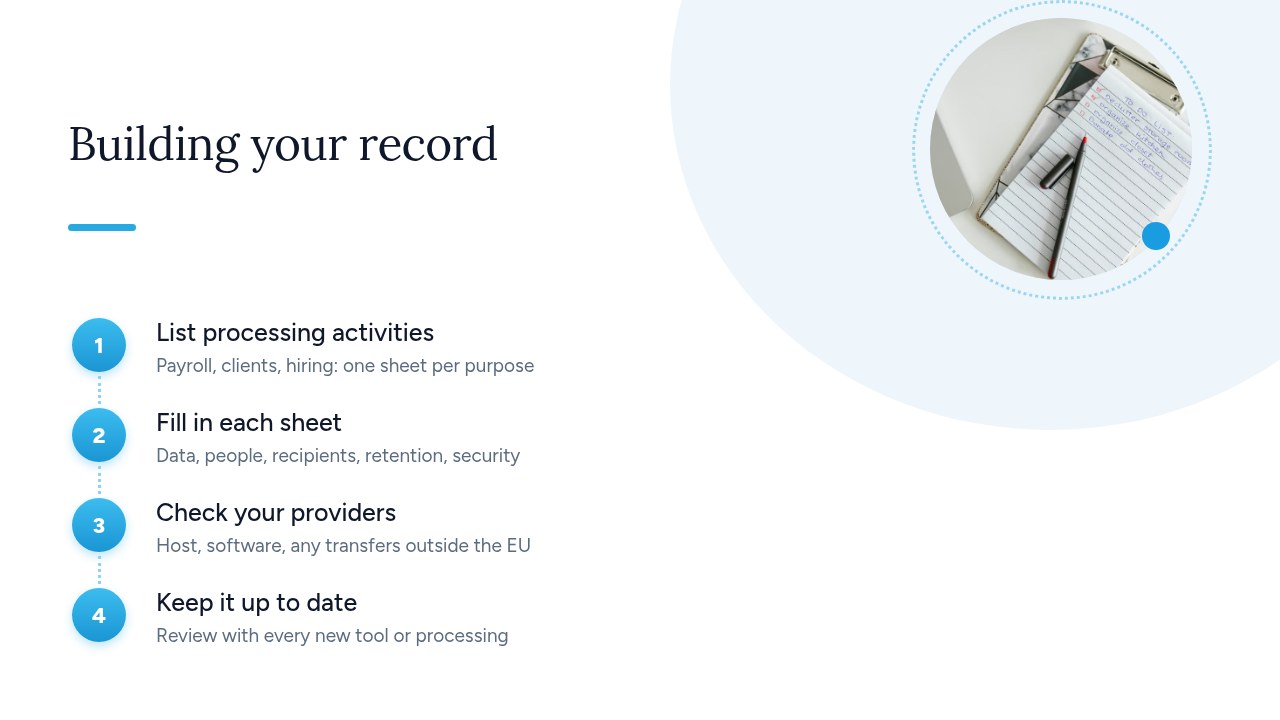
- List your activities: the CNIL's rule is clear: processing operations “must be identified by purpose, not by the software used”. For example, your CRM may be used for both prospecting and after-sales service, which means two entries. Talk to each department: HR for payroll and recruitment, sales for prospecting and customers, accounting for suppliers and invoicing, and IT for user accounts, logs and video surveillance.
- Fill in each entry: the CNIL asks you to “fill in one record entry per activity”. Cover the seven Article 30 items described above.
- Check your service providers: for each tool, note the hosting provider, the SaaS vendor, where the data is stored and any transfers outside the EU. You'll usually find this in the contract or the data processing agreement.
- Appoint someone and keep it up to date: the CNIL says the record can be entrusted to a named person, or to the DPO if there is one. It must then be updated “as things change”: a new tool, a new purpose, a change of service provider.
Pro tip: add a “last reviewed” column to the record. A dated record proves that it is genuinely kept up to date.
What do sample entries look like for an SME or a freelancer?
These four sample entries cover most of the processing carried out by an SME or a freelancer. Adapt them to your situation, and check each retention period against your legal obligations and the CNIL's recommendations.
- Payroll and HR management: the purpose is to pay salaries and file social security returns. It covers employees, with their identity, bank details, social security number and pay. The recipients are the external accountant, URSSAF and the payroll software vendor. Retention follows social security and tax obligations. On the security side, access is restricted to HR and management.
- Customers and invoicing: the purpose is to issue quotes, invoices and payment reminders. It covers customers and prospects, with their contact details and purchase history. The data goes to the accounting department, the external accountant and the tool's hosting provider. Retention follows accounting obligations, and backups are made regularly.
- Recruitment: the purpose is to select candidates based on their CV, cover letter and interview notes. Only the managers involved have access. Retention is limited for unsuccessful candidates, who must be informed of it.
- Video surveillance of the premises: the purpose is to protect property and people. It covers employees and visitors, and footage is kept for a short, defined period. Access is restricted and logged.
If any of these tools is hosted outside the European Union, such as American recruitment software, add a “transfer” line to the entry. It states the country and, where required, the appropriate safeguards, in line with Article 30(1)(e) of the GDPR.
Processors: do you need a second record?
Yes. If you process personal data on behalf of your clients, you must keep a processor record in addition to your own record. This applies to a web agency that runs a client's website, a managed IT services provider, a payroll firm or a freelancer who administers a company's CRM. Article 30(2) of the GDPR sets out what it must contain:
- Your clients: the name and contact details of each controller on whose behalf you act and, where applicable, of their representative and DPO.
- Your own processors: the name and contact details of the processors you use, such as your hosting provider.
- Categories of processing: what you do for each client, such as hosting, maintenance or producing payslips.
- Transfers outside the EU: the destination country and, in some cases, the appropriate safeguards.
- Security measures: a general description, required “where possible”.
This record is organized by client and by type of service, not by purpose. The CNIL recommends one entry per category of activity, such as hosting or maintenance. If you are both a controller for your employees and clients and a processor for those same clients, it advises keeping 2 separate records.
Pro tip: your clients will often ask you for this information to complete their own record. An up-to-date processor record saves you time on every compliance questionnaire.
Which template or tool should you use for your record?
The easiest starting point for an SME is the CNIL's simplified record template in ODS format, which opens in LibreOffice or any other spreadsheet application. According to the CNIL, the older RTF and PDF templates are no longer updated, so use the ODS version. The GDPR does not require any particular tool. As the CNIL puts it: “The format of the record is free and it can be kept on paper or electronically.” You have four options:
- CNIL template (ODS): free and already structured around the mandatory items. Ideal for a freelancer or a micro-business.
- Shared spreadsheet: the CNIL template in a shared workbook, with one tab per entry. Handy when several departments contribute.
- Internal wiki: one page per activity, with a change history. Suits teams that already document their processes.
- Dedicated software: adds review reminders, links to DPIAs and exports. It becomes worthwhile once you have more than a few dozen entries.
Whatever the tool, three requirements stay the same. The record must be in writing, kept up to date and easy to hand over, because Article 30(4) of the GDPR requires you to make it available to the supervisory authority on request. A private company does not have to publish it.
Pro tip: store the record somewhere you control access and exports. It describes your processing and your security measures, so it is a sensitive document, and you need to be able to produce it quickly during an inspection.
What are the risks of having no record, and what will the Digital Omnibus change?
Without a record, you cannot show the CNIL the document that Article 30(4) of the GDPR requires you to keep available for it. You also lose the simplest proof of your compliance. The risks are real:
- Inspection: the record is one of the first documents requested, because it describes your processing, your service providers and your security measures.
- Simplified sanction procedure: in November 2026, the CNIL issued ten sanctions against local authorities, with fines ranging from €3,000 to €20,000, the “legal maximum for this type of procedure”. The breaches concerned security and impact assessments, which are exactly what the record helps you identify.
On the reform side, the proposal known as Omnibus IV would extend the Article 30(5) exemption to organizations with fewer than 750 people, unless the processing is likely to result in a high risk within the meaning of Article 35. In their opinion of 9 July 2025, the EDPB and EDPS welcomed the simplification but asked for clarification, particularly on the choice of 750 rather than 500. Separately, on 19 November 2025 the Commission presented a “Digital Omnibus” that amends other parts of the GDPR, with possible adoption in 2026.
These texts are still proposals. Today, the 250-employee threshold and its exceptions apply. And even after a reform, high-risk processing would still have to be documented.
Yundera: simplify your record entries with a private server in France
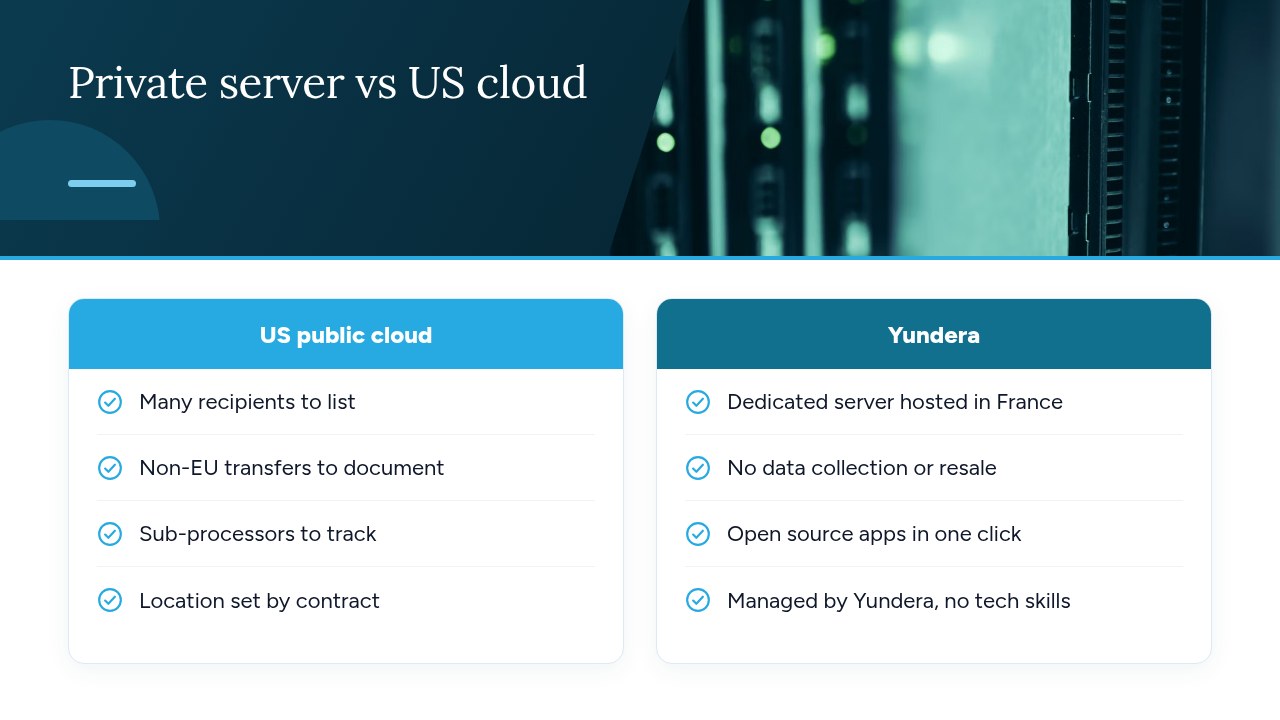
With a private server hosted in France, several tools share the same hosting provider, which makes your record entries shorter and easier to check. Every cloud service you add means new lines: a vendor to list among the recipients, its own processors to track and, if it is hosted outside the EU, a transfer to document under Article 30(1)(e) of the GDPR. An SME that uses five different services for its files, photos, website and office suite therefore fills in these sections five times.
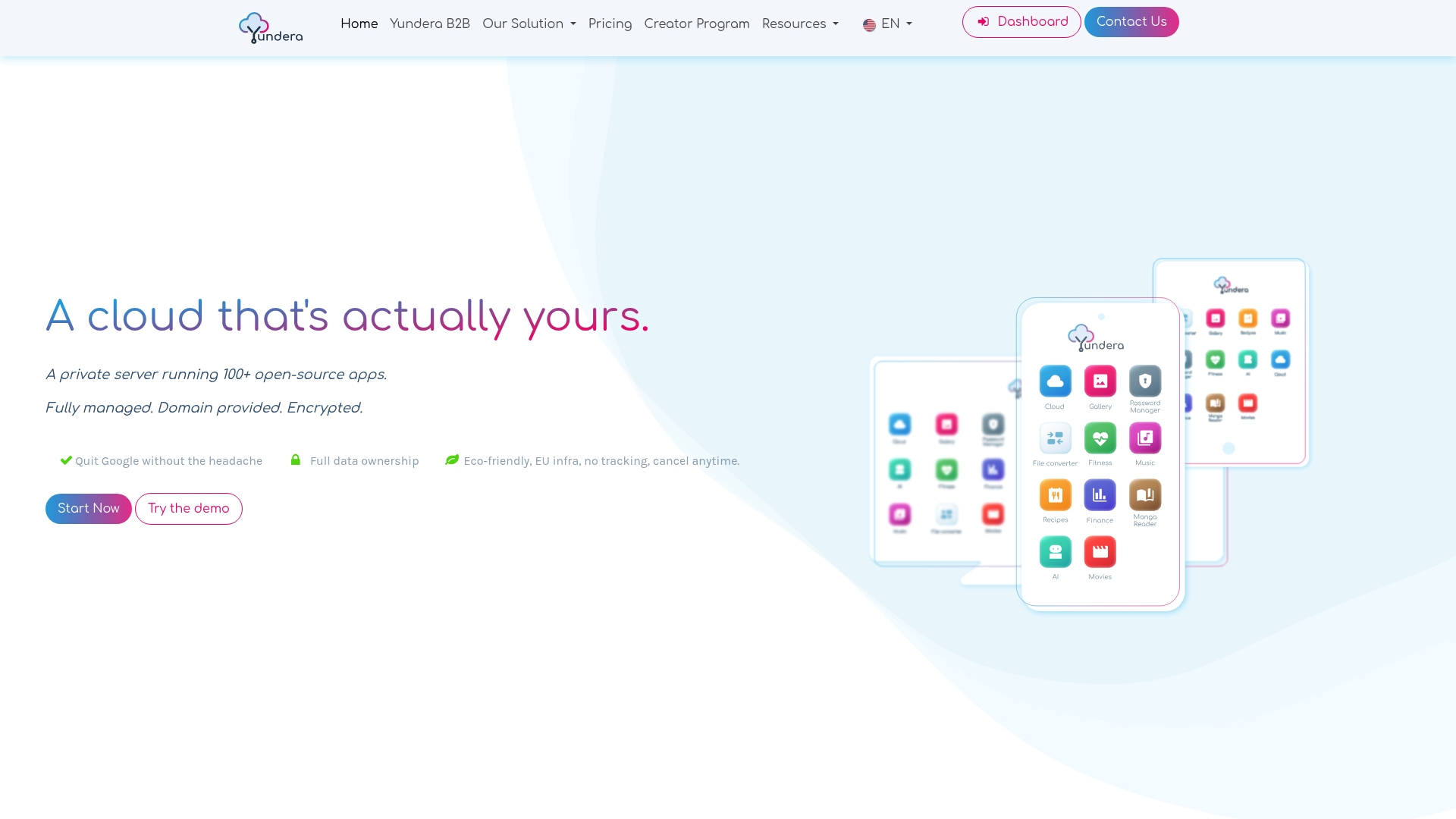
Yundera takes a different approach: a managed private server (Personal Cloud Server), hosted in France and dedicated to a single customer. Ready-to-use open source applications install in one click from an app store, covering file storage, photos, website hosting and office tools. Each application is available over HTTPS on your own domain, with no static IP, no port forwarding and no certificates to configure. Your data stays on your server, and Yundera does not collect or sell it. No technical skills are needed, since Yundera manages the server. Yundera must still appear in your record as a hosting provider. The rest of your compliance work is up to you: our GDPR cloud compliance checklist helps you complete it.
To compare plans and pricing, see the Yundera private servers page.
GDPR record: the most common mistakes to avoid
The most common mistakes are assuming you are exempt and letting the record go out of date. These pitfalls also come up often:
- Assuming you are exempt: having fewer than 250 employees does not exempt regular processing such as payroll or invoicing.
- Organizing by software: the CNIL asks for entries organized by purpose.
- Forgetting your SaaS tools: their processors and their transfers outside the EU must appear in your entries.
- Not keeping it up to date: a record written once and then forgotten no longer reflects reality.
- Confusing it with the privacy policy: the privacy policy informs people, whereas the record documents your processing internally.
- Acting ahead of the Omnibus: the reform is not in force.
A well-kept record is the foundation for your other obligations. It tells you which processing requires an impact assessment, which data is affected by a breach, and where to look for a person's data when they exercise their right of access.
— Yundera
Sources
- The record of processing activities | CNIL
- Regulation (EU) 2016/679 (GDPR), Article 30 – EUR-Lex
- The CNIL's GDPR record | CNIL
- Targeted modifications of the GDPR: EDPB & EDPS welcome simplification of record-keeping obligations
- “Digital Omnibus” regulation proposal – CMS
- Cybersecurity of local authorities: the CNIL issues ten sanctions | CNIL
Frequently Asked Questions
Is the GDPR record of processing activities mandatory for a sole trader?
In most cases, yes. The exemption for organizations with fewer than 250 employees does not cover regular processing, such as managing customers and invoicing. A sole trader who invoices clients must therefore record at least this activity, even if the record is brief.
Does the CNIL provide a free GDPR record template?
Yes. On its page dedicated to the record, the CNIL offers a free simplified record template in ODS format. The older RTF and PDF templates are no longer updated, so use the ODS version.
What is the difference between the controller's record and the processor's record?
The controller's record lists your own processing, organized by purpose: payroll, customers, recruitment and so on. The processor's record lists the clients on whose behalf you process data, the categories of processing carried out, your own processors and any transfers outside the EU. If you play both roles, the CNIL recommends keeping two separate records.
How often should the record of processing activities be updated?
The GDPR does not set a frequency. The record must be updated whenever something changes: a new tool, a new purpose, a change of service provider. On top of that, an annual review, dated in the record, helps prove that it is genuinely maintained.
What is the penalty for having no record of processing activities during a CNIL inspection?
Having no record is a breach of Article 30 of the GDPR, which requires you to make it available to the CNIL on request. Under the simplified procedure, fines can reach €20,000, as shown by the sanctions issued in November 2026. The CNIL can also use the ordinary procedure, which has higher caps.
GDPR Record of Processing Activities: The 2026 Guide for SMEs