Governance First: Choosing Forgejo or Gitea by License

For a fresh instance, Forgejo is the natural pick if community governance and the long-term future of free software matter to you. Gitea still makes sense if you need established commercial support or a permissive MIT-style license. Both cover the same day-to-day work (repositories, issues, pull requests), but migrating between them means checking exactly which versions are compatible before you start.
In short:
- Forgejo ships under GPLv3+, which guarantees that any modification stays open source, while Gitea sticks with the permissive MIT license.
- Migrating from Gitea to Forgejo requires a full backup, a dry run, and a careful compatibility check against older versions.
- Feature-wise, day-to-day repository, issue and pull request management remains similar, but Forgejo has built out its own capabilities around federation and security.
- Forgejo's community governance and operational transparency make it a more strategically stable bet for organisations that care about independence.
- The real differentiator is project strategy: Forgejo's GPLv3+ license enforces a stricter guarantee of openness, whereas Gitea prioritises commercial flexibility.
Table of contents
- Governance, licensing and project direction: the real dividing line
- What stays the same and what is starting to diverge
- Security, testing and upgrade reliability
- Migrating from Gitea to Forgejo: paths and precautions
- Sizing and running your forge day to day
- Which forge to choose for your profile
- How many people keep these projects alive
- Real-world performance
- Available integrations and extensions
- Usability and interface customisation
- Why some teams prefer to outsource operations
- Our take on this choice
- Sources
Governance, licensing and project direction: the real dividing line
Forgejo was created in 2022 as a hard fork of Gitea, triggered by tensions over how that project was governed and over the creation of a commercial entity around its code. The two projects have followed distinct paths ever since: Forgejo moved under the umbrella of Codeberg, a non-profit association, while Gitea continues to evolve with a model that combines an open community and a commercial structure behind it.
The most tangible shift for an administrator or a contributor is the license. Since version 9.0, Forgejo has relicensed its code under GPLv3+, a strong copyleft that forces any modified redistribution to remain open. Gitea, for its part, keeps the far more permissive MIT license.
That divergence has concrete consequences:
- Commercial integration: a company that wants to embed the code in a closed product will find MIT more accommodating than GPLv3+.
- External contributions: Forgejo's copyleft guarantees that improvements flow back to the community, which reassures contributors who care about free software ethics.
- Business model stability: Codeberg's non-profit structure limits the risk that an acquisition or a funding round changes the rules of the game — exactly the scenario a portion of long-time Gitea users worry about.
- Roadmap: Forgejo publicly documents where it diverges from Gitea, particularly on security, localisation and testing, which gives unusually clear visibility into the project's priorities.
Over the long run, this governance choice carries far more weight than any single feature.
What stays the same and what is starting to diverge
Day to day, a developer switching from one platform to the other will feel right at home. The core features are still shared: repository management, pull requests, an issue tracker, wikis, and Git LFS support for large files. The admin interface follows the same overall logic, inherited from the shared codebase that predates the fork.
The differences show up mainly in the layers added after the split:
- CI/Actions: both projects offer a system compatible with GitHub Actions syntax, but Forgejo has evolved its engine independently, with fixes and security restrictions that are not systematically backported to Gitea.
- Package registries: registry support (npm, Docker, Maven) is progressing on both forges, sometimes at different speeds depending on each team's priorities.
- Recent features: Forgejo has introduced changes around federation and fine-grained permission management that have no direct equivalent on the Gitea side.
- Actions marketplace: the ecosystem of reusable actions remains broadly interoperable, but some modules designed for one don't always behave identically on the other, particularly with self-hosted runners.
In practice, a simple CI/CD pipeline migrates painlessly. A complex pipeline that relies on specific third-party actions deserves a test run before you switch.
Security, testing and upgrade reliability
One of the strongest arguments in Forgejo's favour is its operational transparency. The project publishes a public security policy, with a dedicated channel for reporting vulnerabilities and a fix history anyone can review. That policy comes alongside end-to-end tests and upgrade tests run on every change — a practice that limits the risk of a silent regression during a version bump.
Worth noting: recent analyses of self-hosted Git forges converge on one point: the difference between Forgejo and Gitea now hinges far less on features than on governance, licensing, federation and testing strategy. Those are the criteria that tip the balance over time.
Pro tip: before any major upgrade, read the release notes and security announcements for the project you run. A regression in hooks or webhooks often goes unnoticed until a CI pipeline breaks in production.
For a solo administrator, that testing discipline genuinely takes the anxiety out of upgrades. It also explains why Forgejo's security patch cadence is watched closely by administrators running a self-hosted private Git repository exposed to the internet.
Migrating from Gitea to Forgejo: paths and precautions
Compatibility between the two projects is not unlimited. Forgejo documents a supported migration path that typically covers Gitea instances up to version 1.22 moving to Forgejo v10, then on to more recent Forgejo releases. If your Gitea instance is newer than that mapped-out path, a direct migration becomes risky: the database format or certain internal schemas may have diverged with no guaranteed compatibility.
The recommended procedure follows a simple logic:
- Back up the database, the Git repositories and the configuration files before doing anything else.
- Test on a cloned instance: restore the backup to a separate environment and run the migration as a dry run.
- Verify the integrity of issues, pull requests, hooks and webhooks after the test migration.
- Plan an API-based export/import if your source version isn't directly covered by the documented path.
- Switch production over only after full validation on the test environment.
Pro tip: never migrate on a Sunday night without a safety net. Keep the old Gitea instance available in read-only mode for at least a week after the switch, long enough to confirm no external webhook was overlooked.
Sizing and running your forge day to day
In the end, the choice between Forgejo and Gitea matters less than how you size and operate your infrastructure. For solo use or a small team of a few developers, a VPS with modest CPU and memory is more than enough to run the forge itself. Requirements climb quickly once CI enters the picture.
- Light CI and solo use: a modest VPS hosts both the forge and the runner without trouble.
- Small team with frequent builds: move the CI runner off the forge onto a separate machine, since runners consume considerably more CPU and memory than the forge itself.
- Heavy CI (long test suites, multiple Docker builds): isolate runners in scalable containers so a load spike doesn't degrade forge access for the whole team.
- Storage: favour NVMe disks for Git LFS volumes and package registries, which generate a lot of random writes.
A properly configured reverse proxy protects the instance and simplifies TLS certificate management. Add automated backups and basic monitoring of disk space and CPU load.
| Usage profile | Recommended resources | Watch out for |
|---|---|---|
| Solo, a handful of repositories | 2 vCPU, 4 GB RAM | Regular backups are enough |
| Small team, moderate CI | 4 vCPU, separate runner | Monitor runner load |
| Intensive CI, several teams | Isolated, scalable runners, dedicated NVMe | Strict forge/CI isolation |
Which forge to choose for your profile
For a new personal or non-profit deployment, Forgejo is the most coherent choice if community longevity and transparent governance matter to you. Its public security policy and non-profit governance are especially reassuring for administrators running a self-hosted Git server over the long haul, without a commercial safety net.
Stay on Gitea if your organisation already depends on existing commercial support, or if the MIT license is a non-negotiable contractual requirement for integration into a proprietary product. Comparative analyses published in early 2026 confirm that Gitea retains its natural place in the enterprise ecosystem, where compatibility with commercial third-party tooling outweighs governance considerations.
Plan a migration if your priority shifts toward keeping the project independent of commercial interests, or if you want to benefit from Forgejo's progress on federation. Prioritise the backup and the dry run first — never a direct switch in production.
How many people keep these projects alive
The size and structure of a community directly determine how fast bugs get fixed and how rich the documentation is. Forgejo relies on Codeberg's infrastructure, where the project's repositories, actions and discussions show steady development activity, driven by contributors committed to the forge's non-profit model.
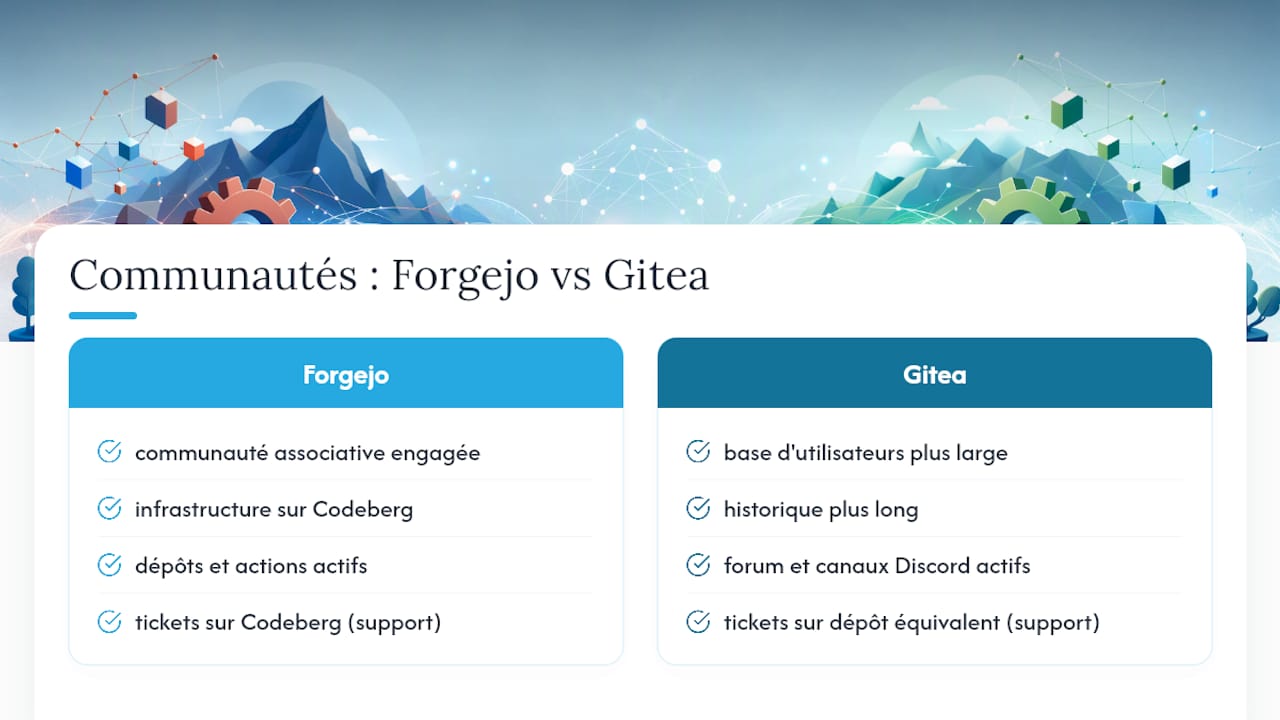
Gitea, meanwhile, benefits from a longer history and a wider user base, with an active community forum and busy Discord channels frequented by administrators from all walks of life, from personal homelabs to enterprises.
In both cases, the primary technical support channel is still the code repository itself: issues opened on Codeberg for Forgejo, or on the equivalent platform for Gitea, serve as both a support forum and a bug tracker. Each project's official documentation remains the most reliable reference, since third-party tutorials age fast for software that moves at this pace.
For a lone administrator, community responsiveness counts as much as code quality. A security issue handled within days on Forgejo, with a clear public announcement, weighs on the decision at least as much as an extra feature.
Real-world performance
On paper, Forgejo and Gitea still share a good chunk of their historical codebase, which explains comparable performance on everyday operations: cloning, rendering diffs, searching across repositories. The gaps observed in real conditions come less from the engine itself than from server configuration and CI runner load.
One friction point comes up repeatedly among administrators running active CI on a modest machine: the forge itself stays lightweight, but a runner building Docker images or executing long test suites can saturate the CPU and slow the web interface for every connected user. That's exactly why separating the runner from the forge — already mentioned under sizing — has a direct, measurable impact on day-to-day perceived responsiveness.
On large repositories with a heavy history, using Git LFS and NVMe storage makes more difference than the choice between the two forges. Both projects handle pagination of repository and issue lists correctly, even with several thousand objects, as long as the underlying database (PostgreSQL is recommended in production) is properly sized.
Available integrations and extensions
Both platforms integrate with the standard DevOps toolchain: conventional Git clients, secret managers, vulnerability scanners, and external authentication systems such as OAuth2 or LDAP for enterprise SSO. Compatibility with GitHub Actions syntax makes it easy to reuse existing workflows without a full rewrite.
On the webhook side, both forges can trigger notifications to Slack, Discord or external continuous deployment services. Integrations with third-party project management tools are generally handled through generic webhooks rather than native plugins, unlike more closed commercial platforms that offer dedicated extension marketplaces.
The most notable difference looking ahead concerns federation via the ActivityPub protocol, a roadmap item Forgejo is actively exploring to eventually enable interaction between independent instances, much like the fediverse. This direction is still a work in progress rather than a mature feature, but it clearly sets Forgejo's long-term ambition apart from Gitea's.
Usability and interface customisation
Both interfaces inherit a common base from the fork, which is why anyone familiar with one will find the other almost identical to use. Per-repository navigation, pull request views with inline diffs, an issue dashboard: nothing will throw off a developer used to either forge.
Customisation options are comparable too: light and dark themes, custom logo and instance name, fine-grained permissions per team and per repository. Forgejo has pushed a little further on certain privacy and accessibility settings, in keeping with its public security policy and its attention to localising the interface into several languages.
For a non-technical user who occasionally needs to consult a repository (reviewing documentation, following an issue), both tools require at least some familiarity with Git concepts. That's true of every self-hosted forge, and it's one of the reasons some teams without in-house systems expertise turn to a managed solution rather than pure self-hosting.
Why some teams prefer to outsource operations
Choosing between Forgejo and Gitea already means accepting the operational burden: upgrades, backups, network security, runner sizing. For a team without a dedicated system administrator, or one facing compliance requirements around data residency, that burden quickly becomes the real hidden cost of self-hosting.
Yundera offers a managed alternative: a personalised private server, hosted in France, where you retain full ownership of your data and can export it at any time. The platform bundles more than 100 pre-installed open source applications, accessible through your own domain, with no technical configuration on your side. For a team that wants the sovereignty of a self-hosted private Git repository without carrying the day-to-day operations, or for an SME looking to cut infrastructure costs, the Yundera private servers page explains how the offering works.
Our take on this choice
Most comparisons treat Forgejo and Gitea as two almost interchangeable pieces of software, betting everything on feature tables. That's the wrong lens. The real question isn't "which platform does what better today" but "which governance structure do you want to support five years from now". Forgejo's relicensing to GPLv3+ isn't an incidental legal detail: it's a bet on the code's longevity against any future attempt to close it off — a bet Gitea's MIT license deliberately declines to make.
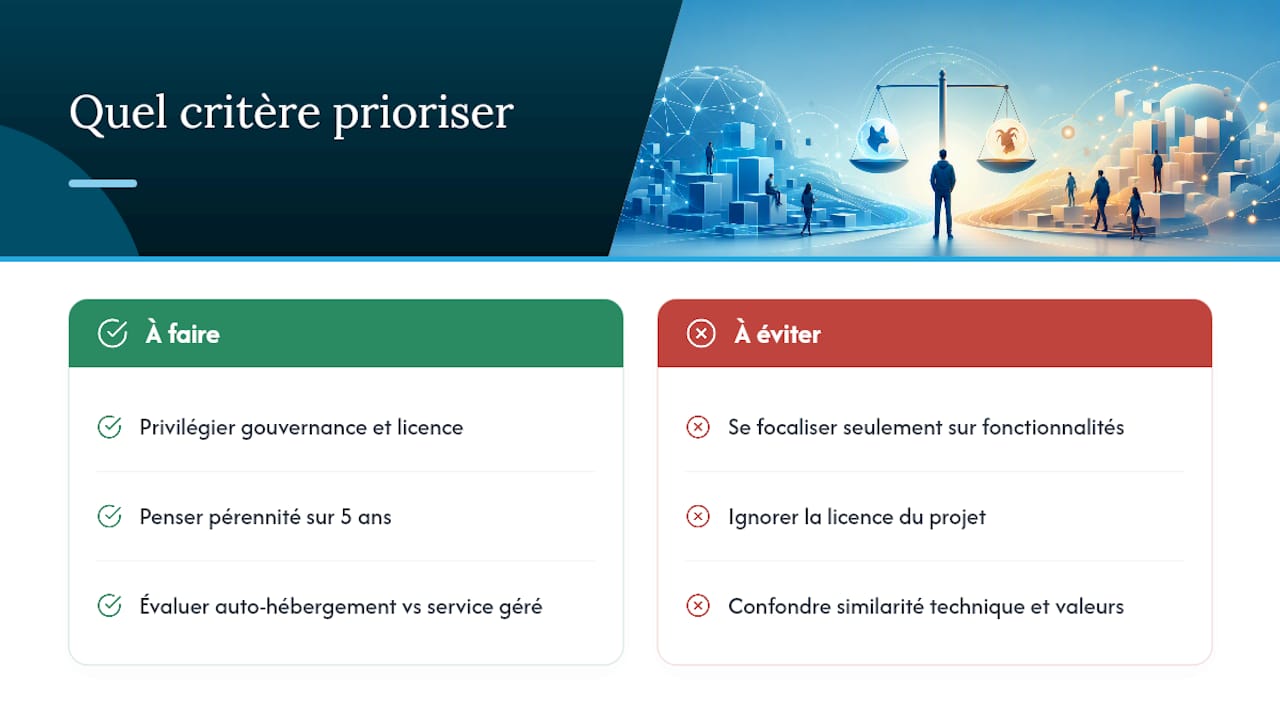
What strikes us is how technically close the two projects remain while diverging fundamentally on the values they embody. An administrator in a hurry will focus on CI or package registries. An administrator thinking long term will look first at who governs the project and under what license their work will be redistributed. We think the second lens ages far better than the first, especially for a self-hosted private Git setup meant to last.
One blind spot remains common to both: neither Forgejo nor Gitea solves the question of hosted day-to-day operations. For many teams, the real choice may not be between the two forges, but between self-hosting and handing that burden to a managed service.
— Yundera
Sources
- Forgejo — GPL relicense announcement (2024-08)
- forgejo/forgejo on Codeberg
- Forgejo vs Gitea 2026: Which Self-Hosted Git Forge to Run — TechFuelHQ
Governance First: Choosing Forgejo or Gitea by License