Cloud Access Control: The Priorities for a Private Server

Cloud access control is the set of rules and tools that decide who can connect to your applications and data hosted on a private server, and what each person is allowed to do once they're in. Two actions matter more than all the others. First, enable phishing-resistant multi-factor authentication on every administrator account, no exceptions. Second, put a regular access review in place, with a clear procedure for revoking access as soon as it is no longer justified.
Neither of these habits is excessive caution. They match what the NIS2 directive already requires of essential and important entities when it comes to strong authentication, and what any serious audit will check first.
- Enable phishing-resistant MFA (methods such as WebAuthn/FIDO2) on every admin account
- Document a procedure for reviewing and revoking access rights on a regular basis
- Confirm that your data remains exportable at any time — concrete proof that you're in control
Key takeaways
Cloud access control rests on three inseparable pillars: strong authentication, permissions limited to what is strictly necessary, and full traceability of every action.
| Point | Details |
|---|---|
| Phishing-resistant MFA | Favour WebAuthn/FIDO2 over SMS for all high-privilege accounts. |
| Least privilege by default | Combine RBAC and ABAC to limit every access to the actual business need. |
| Non-human identities under control | Manage service accounts and API keys with automatic rotation and dedicated vaults. |
| Documented reviews and evidence | Run an access review at least once a year and retain the audit logs NIS2 requires. |
| Guaranteed sovereignty and export | A managed offering such as Yundera centralises MFA and access management while guaranteeing data export. |
Table of contents
- The fundamentals of cloud access control: IAM, RBAC and protocols
- How do you set up access control on your private server?
- Which technical controls actually reduce risk?
- Logging, audits and NIS2 compliance
- What a managed offering changes for your access governance
- What field experience reveals about access control
- Take back control of your access with a managed private server
- Frequently asked questions about cloud access control
- Sources
The fundamentals of cloud access control: IAM, RBAC and protocols
Behind the acronym IAM (identity and access management) sits a simple logic, summed up by the AAA principle. Authentication: proving who you are, usually with a password plus a second factor. Authorisation: determining what you are allowed to do once identified. Audit: keeping a record of every action so you can answer the question "who did what, and when?". A serious IAM system centralises these three pillars plus account lifecycle management, which makes it the backbone of a Zero Trust approach.
Two models dominate when it comes to deciding who has access to what:
- RBAC (role-based access control) assigns permissions by job function: an accountant gets billing, a developer gets the code, an administrator gets the server configuration.
- ABAC (attribute-based access control) refines that logic with dynamic conditions: time of day, location, device type, or how sensitive the file being opened is.
In practice, combining the two has become the norm: RBAC provides a base that is simple to manage, and ABAC adds the granularity sensitive cases demand. That combination relies on technical protocols you'll come across often: SSO (single sign-on) through an identity provider (IdP), SAML or OAuth 2.1/OIDC for secure token exchange, and SCIM to automate account creation and removal across systems.
How do you set up access control on your private server?
Structuring your access doesn't require a dedicated security team, but it does follow a logical order.
- Pick a single point of entry. A centralised identity provider, or your host's built-in SSO offering, avoids multiplying passwords and weak points.
- Roll out phishing-resistant MFA on sensitive accounts first. WebAuthn/FIDO2 security keys offer far stronger protection than SMS codes for admin consoles.
- Define clear roles based on the principle of least privilege. Each user should only have access to what they genuinely need, and nothing more.
- Automate provisioning with SCIM. Creating accounts — and above all removing them — must be systematic, never left to an administrator's memory.
- Protect non-human identities separately. Service accounts and API keys are managed differently from human accounts: automatic rotation, digital vaults and short-lived identities sharply reduce the attack surface.
That last point deserves your immediate attention. Service accounts and API keys often outnumber human accounts, and they account for a significant share of recorded security incidents.
Pro tip: Never treat a service account like an ordinary user account. Automate its creation with a very short-lived identity, and store the associated secret in a vault with built-in rotation rather than in a configuration file.
For technical leads at small and mid-sized companies who are new to these topics, a digital security checklist designed for company directors makes a useful complementary starting point.
Which technical controls actually reduce risk?
Some settings make a difference wildly out of proportion to what they cost to implement.
- Favour WebAuthn/FIDO2 for any sensitive authentication, and avoid SMS wherever possible: AWS's recommendations on multi-factor authentication point clearly in that direction.
- Restrict API access with an IP allowlist rather than opening it up universally.
- Ban API keys attached to a root account: they should never exist in production.
- Require step-up MFA before any sensitive operation, such as deleting data or changing a critical configuration.
- Set up automatic revocation of inactive access after a defined period.
The operational best practices for securing cloud access also stress the importance of eliminating unchecked wildcard policies — those overly permissive rules that silently authorise more actions than needed.
Collecting access logs is only worth something if the logs get used. Correlating them regularly, even in a basic way, lets you spot a suspicious login attempt or abnormal behaviour before it turns into an incident. A signal stays just a signal as long as nobody looks at it.

Logging, audits and NIS2 compliance
An audit never just checks that your controls exist. It checks that you can prove it.
The logs worth keeping cover four categories: authentication and authorisation attempts, actions performed by administrator accounts, secret and key rotations, and access revocation events. Without those traces, reconstructing an incident after the fact is impossible.
- Retain authentication and authorisation logs long enough to cover a full audit cycle.
- Document every access review, ideally at least once a year, with the date and the person responsible.
- Formalise a written offboarding procedure: who revokes what, and within what timeframe, after someone leaves.
- Export your evidence in readable, portable formats, never locked inside a proprietary tool.
France's CNIL and ANSSI recommend a risk-based approach to prioritising MFA rollout, starting with the accounts that reach the most sensitive data. That is exactly what NIS2 auditors are looking for: documented strong authentication, not just something enabled by default. To dig into the legal framework around hosting, the guide to hosting data in France details the obligations decision-makers carry.
What a managed offering changes for your access governance
Understanding the mechanics of cloud access control is one thing. Implementing them properly, without a dedicated IT team, is another. That gap is exactly what a solution like Yundera sets out to close.
Yundera hosts its private servers in France and commits to never collecting or reselling its users' data, which gives access control a concrete foundation: genuine sovereignty over what you store. That guarantee translates into specific features:
- Centralised access management with no manual technical configuration
- Multi-factor authentication built in from day one
- Data export available at any time — tangible proof that you still own your information
Pro tip: If you run a small organisation without a dedicated sysadmin, always check that a host offers data export before you sign. It's the best indicator that they won't lock you into their system.
A freelancer can protect client files this way without configuring an IdP themselves. A small company can distribute differentiated permissions across teams without hiring a security specialist.
What field experience reveals about access control
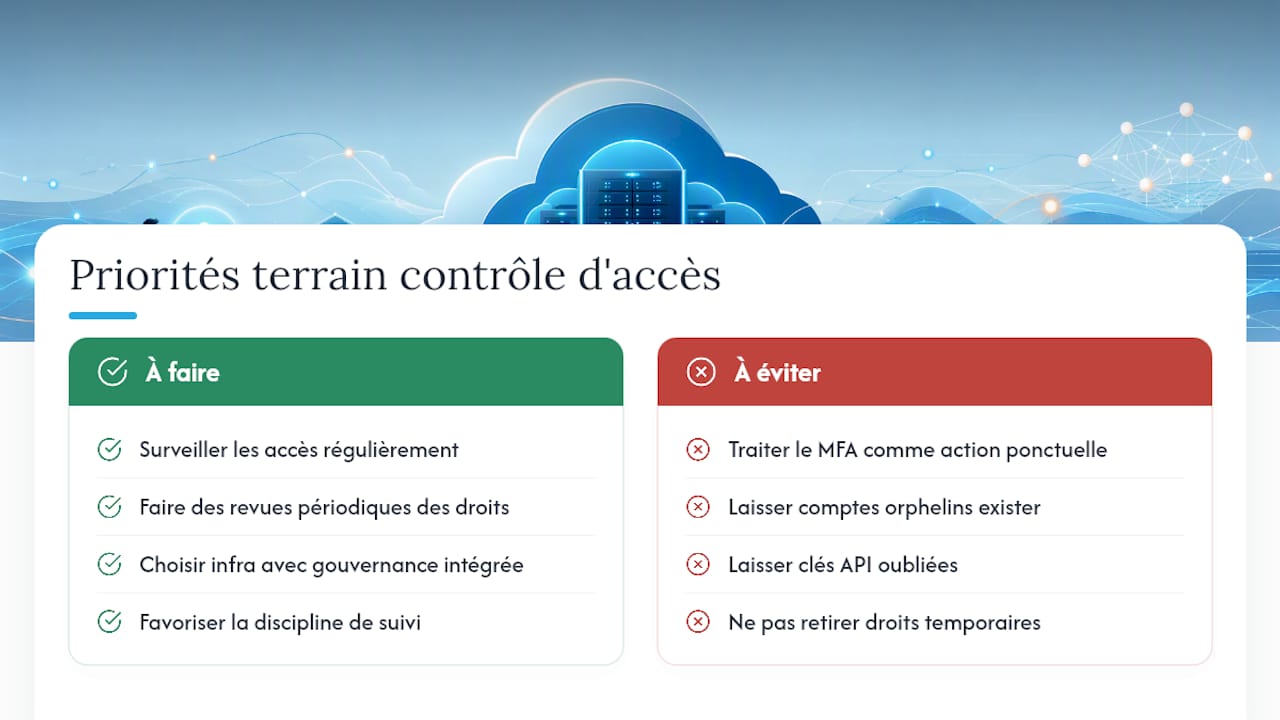
Most guides on cloud access control treat the subject as a one-off technical project: configure MFA, close the file. It's the industry's most expensive blind spot. An access system is never a stable state, it's a living process that degrades the moment nobody is watching it.
The real problem is almost never the absence of MFA at the start. It's the silent accumulation of orphaned accounts, forgotten API keys, and permissions granted temporarily and never withdrawn. That gradual drift explains why periodic access reviews weigh so heavily in NIS2 audits: they catch what automated tools miss.
For individuals and small organisations, the real priority isn't mastering every technical protocol. It's choosing an infrastructure where governance discipline is built in by default, rather than rebuilding it alone from scattered tools. Technical skill matters less than the discipline of following through over time.
Take back control of your access with a managed private server
Setting up your own IdP, RBAC policies and API key rotation takes time that many freelancers and small companies simply don't have. Yundera solves that by building MFA, centralised permission management and data export into a managed private server, hosted in France, without ever collecting or reselling your information.
You keep full ownership of your data while benefiting from access governance already designed with compliance in mind. For companies looking to cut IT infrastructure costs without sacrificing security, the page dedicated to SMEs and startups lays out the concrete gains.
Frequently asked questions about cloud access control
Is cloud access control mandatory for a small organisation? There's no general legal obligation on very small organisations outside NIS2, but the best practices recommended by the CNIL apply as soon as there is sensitive data to protect, whatever the size of the organisation.
What's the difference between authentication and authorisation? Authentication verifies your identity; authorisation determines what you're allowed to do once identified. The two work together but remain distinct mechanisms.
Is RBAC enough for a small business? RBAC covers most straightforward cases, but adding ABAC rules becomes useful as soon as certain access depends on context, such as location or the type of device being used.
How do you manage API keys securely? Store them in a dedicated vault with automatic rotation, never in a configuration file or a code repository, and avoid attaching them to a primary administrator account.
Sources
- Strong authentication (MFA): legal obligations, methods and implementation
- Identity and access management (IAM) — practical guide
- What is IAM? Complete technical definition 2025 - Zeroday Cyber Academy
- AWS — multi-factor authentication in IAM
Cloud Access Control: The Priorities for a Private Server